
How to pay NHIF: Below is the process showing you how you can remit your health insurance contributions via M-Pesa.
- Go to Safaricom menu and select MPESA.
- Choose the Pay Bill option.
- For the M-pesa NHIF Pay bill number (business number), enter 200222.
- Enter your contributor’s National Identity Card Number.
- Enter the amount to contribute.
- M-PESA asks for your M-PESA PIN. Enter your Mpesa PIN and hit OK.
- M-PESA gives you the confirmation screen. Carefully confirm that all the details are correct. Press OK to finish to pay NHIF via Mpesa.
- You will receive an M-PESA Transaction confirmation SMS!
How to pay NHIF: Pay NHIF via Mpesa Transaction Charges
The following are the NHIF payment rates for NHIF Mpesa payment, charged by Safaricom when you pay NHIF via Mpesa.
To calculate your actual NHIF monthly contribution, check this new NHIF rates table, whose premium deductions depend on your salary range.
| Min. Amount (Ksh) | Max. Amount (Ksh) | Charge (Ksh) |
| 10 | 49 | 3 |
| 50 | 99 | 5 |
| 100 | 499 | 22 |
| 500 | 999 | 22 |
| 1,000 | 1,499 | 22 |
| 1,500 | 2,499 | 22 |
| 2,500 | 3,499 | 33 |
| 3,500 | 4,999 | 33 |
| 5,000 | 7,499 | 33 |
| 7,500 | 9,999 | 33 |
| 10,000 | 14,999 | 33 |
| 15,000 | 19,499 | 33 |
| 20,000 | 24,999 | 33 |
| 25,000 | 29,999 | 33 |
| 30,000 | 34,999 | 33 |
| 35,000 | 39,999 | 44 |
| 40,000 | 44,999 | 44 |
| 45,000 | 49,999 | 44 |
| 50,000 | 70,000 | 55 |
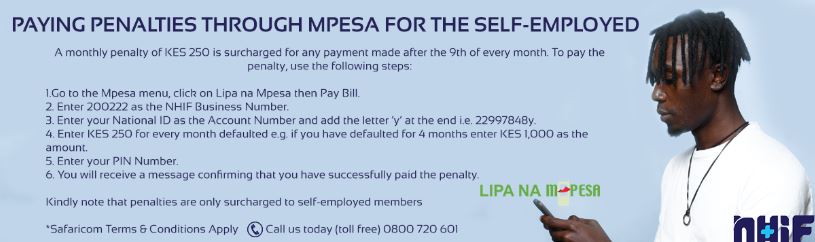
How to Pay Penalty Via M-Pesa Paybill
Sometimes you can forget to pay your NHIF monthly contribution if you are self-employed, which results in a penalty of Ksh 250.
Here is how you can pay the penalty via Mpesa:
1. Go to M-Pesa and click ” Lipa na M-Pesa”
2. Enter 200222 as the NHIF Business number.
3. For account Details, enter your National ID number then add the letter “Y” at the end i.e “32688811y”.
4. Enter Ksh 250 for every month you have defaulted.
5. Enter your Mpesa PIN.
6. You will receive a confirmation message for the payment.
Note: This is only applicable to self-employed NHIF members.
How to check NHIF account status online via the web
Here is the step by step procedure:
1. With your internet-enabled device, get to the NHIF official website: www.nhif.or.ke
2. There is a self-service portal for you to sign up to gain access
3. If you are visiting the site for the very first time, you need to first register in order to receive the services.
There are three paramount requirements;
The NHIF card numbers, a valid email address and a day working phone number in case they would like to reach up to you for enquiries or other reasons.
4. This follows several prompts to fill up other personal details which should be dully filled before saving or submitting.
5. Develop a password that you will use every time you log onto the portal, this should be easy to remember yet not so obvious.
However, it can be reset in case you have completely forgotten your password for the NHIF account status online enquiry.
Technically, this is how to create an NHIF self-service individual account.
6. Now, log onto the NHIF self-service portal and proceed on to get your NHIF account status online.
7. For the security of your bio, log out from the device after you are done checking the NHIF account status online Kenya.
How to check NHIF account status online using the mobile phone
The use of mobile phone in checking NHIF account status is highly reliable and very easy to use.
Here is the procedure:
1. Go to the main menu on your mobile phone and select the message icon by touching.
If using an android phone just click on the icon.
2. This opens the message thread for inbox, at the top there is a compose prompt, click on it.
3. At the message space, type ID, a space followed by the ID number or the Passport number if applicable.
For example, ID 123456 sent to the NHIF number which receives and processed details for you.
4. This message should be sent to 21101 which is NHIF recipient.
Information regarding your NHIF account status will be processed and send back to you in a text message.
Related reporting
More Business News →
High Court Blocks Oigara Bank Fraud Probe as Stanbic CEO Escapes Questioning

15 Proven Ways to Make Money Online in Kenya; No Scams!

High Court Halts Equity Bank's Takeover Bid on Swafi Foods in Landmark Ruling
